
Getting Started with AWS in 2026: The Services We Use at ARENA

Where to start with AWS: The essential services
AWS offers more than 200 services, but real-world projects rely on just a handful of them. At ARENA, we deploy products for financial institutions, such as SmartConverter, and consistently rely on the same six: VPC, IAM, EKS with ECR, RDS, S3 with Secrets Manager and KMS, and CloudWatch.
This guide does not simply repeat the official documentation. It explains what each service does, how we use it and which mistakes are worth avoiding from day one.
The cloud is not automatically cheaper than an on-premises data centre. It becomes cost-effective when you only pay for what you use and keep spending under control. What always changes, however, is the time required: an environment that once took weeks to set up can now be deployed in minutes. At ARENA, we do this through code, as we explain in our article on Terraform and Jenkins in SmartConverter.
In banking, there are two additional requirements: data must remain in the location specified by the client, and every access must be logged. That is why we deploy in the AWS Spain Region (eu-south-2), with security considered from the outset in every decision covered in this guide.
How AWS Services Work Together in a Cloud Architecture
Before looking at each service individually, here is the architecture we use across our products.
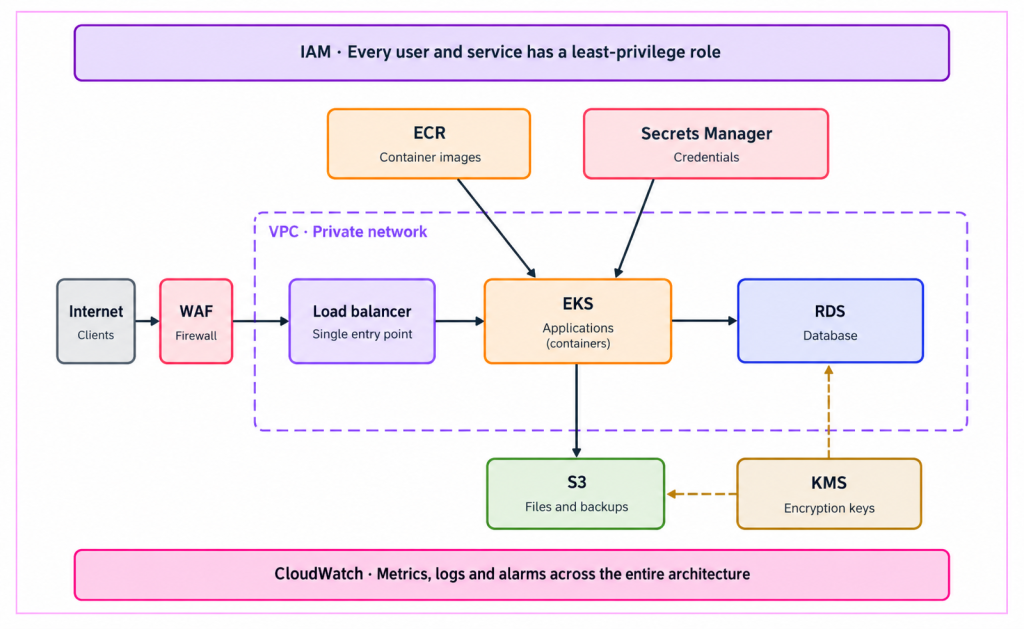
Figure 1 · How the Six Services Fit Together in an ARENA Product
Requests enter exclusively through the load balancer and reach the applications running on EKS. These applications pull their container images from ECR, retrieve their credentials from Secrets Manager, and store data in RDS and S3. IAM and CloudWatch operate across the entire architecture, managing access and monitoring.
Amazon VPC: How to Set Up a Private and Secure Network in AWS
Before launching any services, you need to decide which components can communicate with each other. That is where Amazon VPC (Virtual Private Cloud) comes in: a private, isolated network within AWS where all other services are deployed. Within this network, you define public subnets (accessible from the internet) and private subnets (accessible only from within the network), along with the rules governing traffic between them.
How We Use Amazon VPC at ARENA
Our VPCs span three Availability Zones to ensure that an outage in one data centre does not interrupt the service. The public subnet contains only the load balancer, which receives incoming requests, and the NAT gateway for outbound internet access. Applications and databases run in private subnets. A Web Application Firewall (WAF) protects everything exposed to the internet.
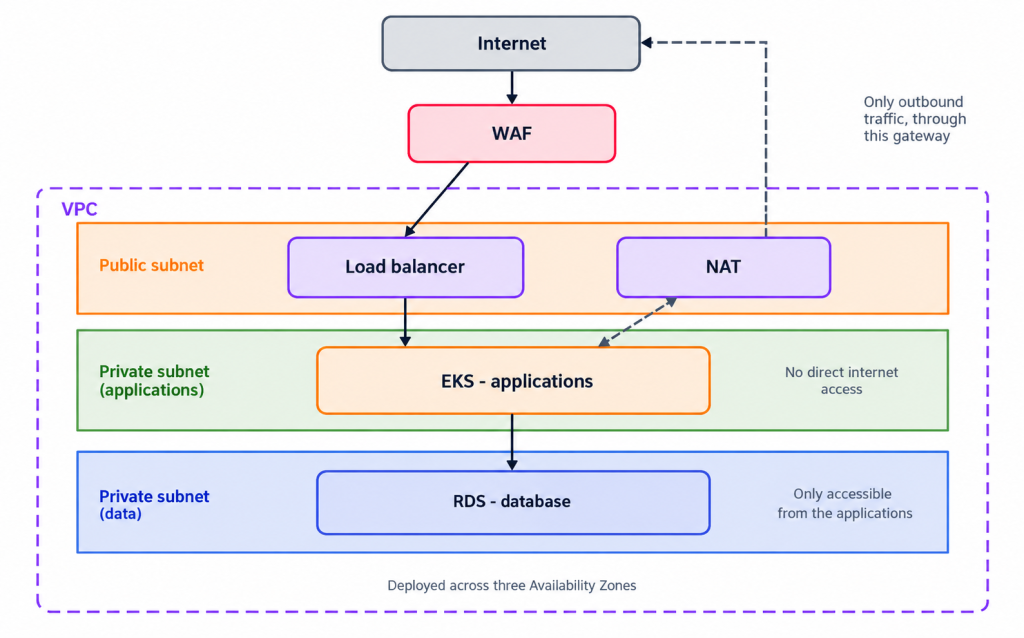
Figure 2 · ARENA’s VPC · One Public Subnet and Two Private Subnets
AWS IAM: Managing Identities, Access and Permissions in the Cloud
AWS Identity and Access Management (IAM) controls who can do what within an AWS account. Every user, application or service accesses resources through a role with explicitly defined permissions.
The underlying principle is least privilege: each user or service is granted only the permissions needed to perform its function, and no more.
How We Manage Access Permissions at ARENA
We define four access profiles, all managed through Terraform:
Platform Administration: Full access, used exclusively to apply infrastructure changes. This is not anyone’s day-to-day working role.
DevOps: Can deploy and operate services, but cannot manage permissions or modify databases.
Development: General read access and deployment permissions limited to development environments.
Extended Development: The same permissions as Development, plus the ability to manage application users.
Applications do not use access keys. Each microservice is assigned its own role through EKS Pod Identity, with only the permissions required to perform its tasks. AWS automatically rotates its credentials, and every API call is logged in CloudTrail.
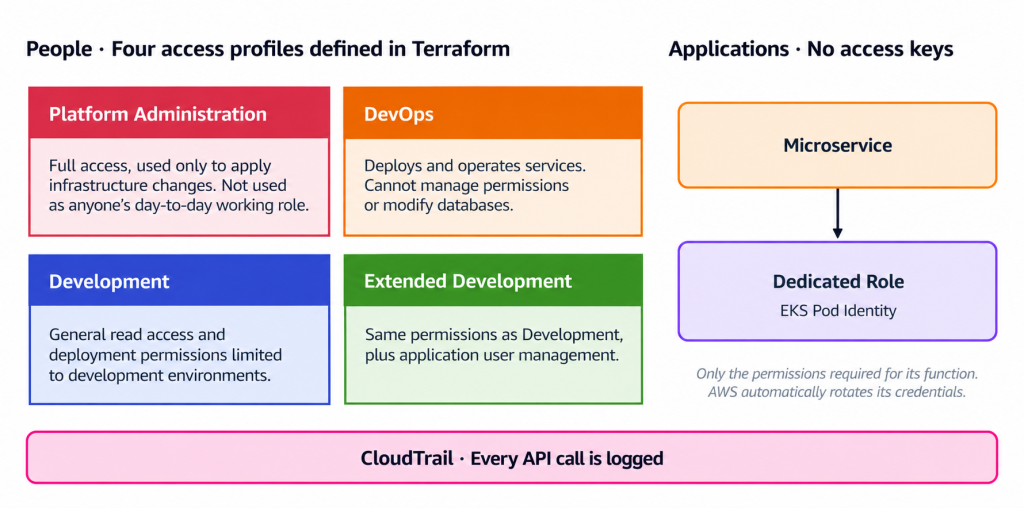
Figure 3 · User Access Profiles and Dedicated Roles for Each Microservice
Common mistake: Storing access keys in source code, configuration files or environment variables. A leaked key in a repository can give anyone who finds it access to the AWS account.
Amazon EKS and ECR: Deploying and Managing Containerised Applications
The first service almost everyone tries is Amazon EC2: on-demand virtual servers. It remains the foundation of many cloud architectures, but managing individual servers becomes increasingly difficult as a product grows to include dozens of microservices.
That is why, at ARENA, we package each service in a container. Amazon ECR (Elastic Container Registry) is where these container images are stored and versioned. Amazon EKS (Elastic Kubernetes Service) is the managed Kubernetes service that runs them: it distributes workloads, restarts failed containers and scales capacity as traffic increases.
EC2 instances are still part of the infrastructure, but with EKS Auto Mode, EKS automatically provisions and removes them as needed.
How We Deploy Microservices with EKS and ECR at ARENA
A single cluster supports both development and pre-production environments, separated by namespaces with resource quotas and network policies that isolate products from one another.
Our Jenkins pipeline builds each service, pushes its container image to ECR and deploys it to EKS.
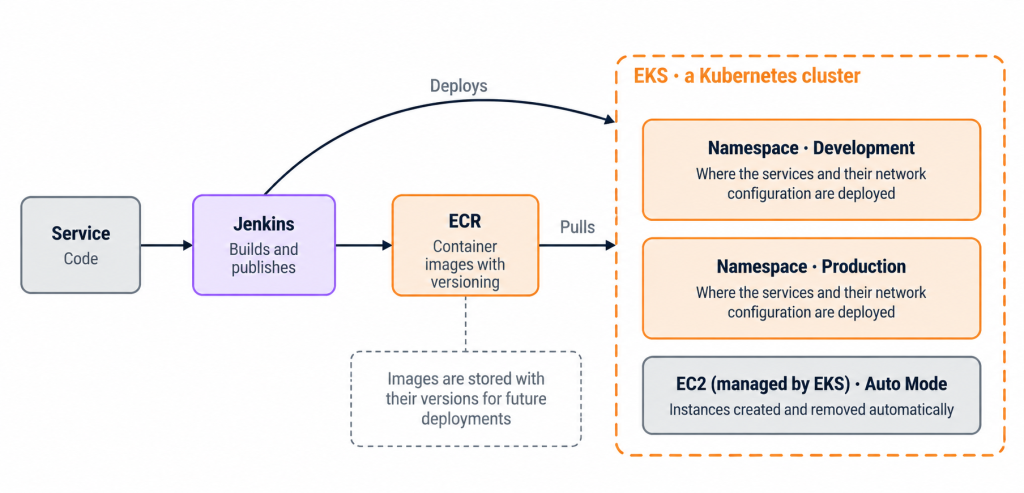
Figure 4 · From Code to Cluster: Jenkins, ECR and EKS
Common mistake: Allowing old container images to accumulate indefinitely. An ECR lifecycle policy retains only the latest versions, avoiding unnecessary storage costs.
Amazon RDS: Managed Databases and High Availability in AWS
Amazon RDS (Relational Database Service) provides managed relational databases (PostgreSQL, MySQL, SQL Server, among others).
AWS handles installation, patching and backups, while the team focuses on database schemas and queries.
It supports read replicas and Multi-AZ high availability: a standby instance in another Availability Zone that takes over if the primary instance fails.
How We Manage Databases at ARENA
We use PostgreSQL, and Aurora for SmartConverter. We tailor the configuration to each environment:
Development: A single instance, as downtime here does not affect anyone outside the team.
Pre-production: Multi-AZ with a standby replica to validate high availability before moving to production.
Non-production environments: Databases are automatically shut down from 9:00 PM to 7:00 AM on weekdays. No one uses them during these hours, resulting in direct cost savings.
Data is encrypted using our own encryption keys, and credentials are stored in Secrets Manager, never in the code.
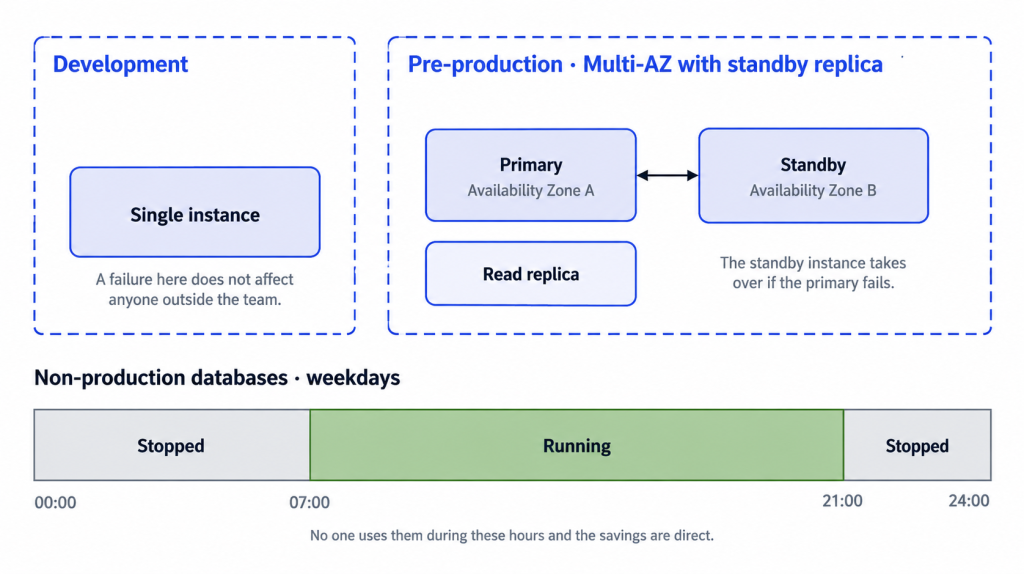
Figure 5 · RDS Configuration by Environment and Shutdown Schedule
Common mistake: Placing the database in a public subnet to make connections easier. It should run in a private subnet and only accept connections from the applications that use it.
Amazon S3, Secrets Manager and KMS: Data Storage and Security in AWS
These three services protect an application’s most sensitive assets: its files, passwords and the encryption keys that secure both.
Amazon S3: Secure Cloud File Storage
Amazon S3 stores objects such as files, backups and logs. Each file is stored in a bucket, and AWS automatically replicates it across multiple locations, making data loss extremely unlikely. Different storage classes are available, offering varying levels of performance and cost depending on how frequently the data is accessed.
AWS Secrets Manager: Secure Credential Management
AWS Secrets Manager stores credentials (such as database passwords and credentials for external services) outside the application code. Applications retrieve them at runtime, provided their assigned role has the necessary permissions.
AWS KMS: Data Encryption and Protection
AWS Key Management Service (KMS) manages encryption keys. Using your own encryption keys also provides a way to revoke access: if a key is disabled, the data encrypted with it can no longer be read.
How We Protect Data and Credentials at ARENA
All our S3 buckets have public access blocked, with encryption and versioning enabled. One of these buckets stores the Terraform state, which describes our entire infrastructure.
We use three separate KMS keys: one for data, one for secrets and one for logs. This ensures that revoking access to data does not compromise the audit trail of what happened.
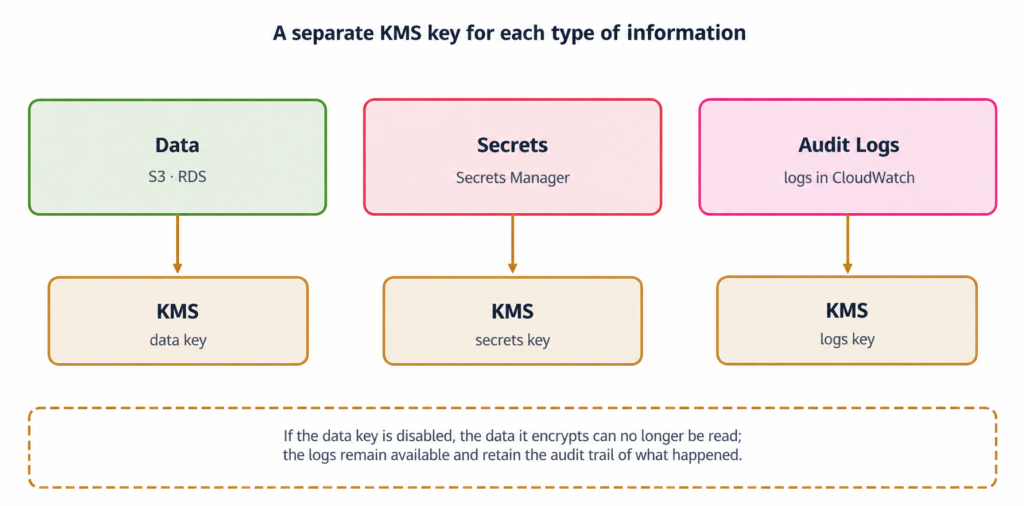
Figure 6 · Separate KMS Keys for Data, Secrets and Logs
Common mistake: Leaving an S3 bucket publicly accessible. This is one of the most common causes of cloud data breaches and can be prevented by enabling Block Public Access from the outset.
Amazon CloudWatch: Application Monitoring and Observability in AWS
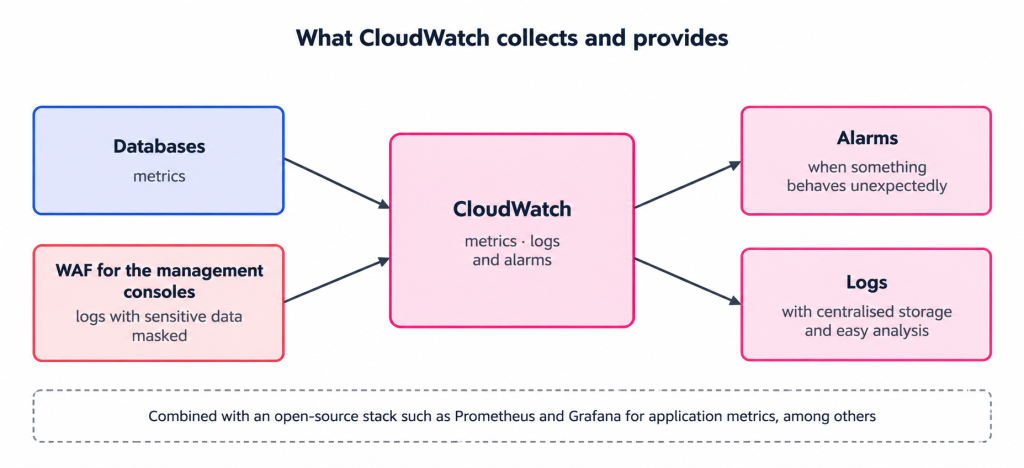
Amazon CloudWatch is AWS’s monitoring service: it collects metrics (CPU, memory, traffic), centralises logs and triggers alarms when something behaves unexpectedly.
It helps detect problems before users notice them and makes it possible to investigate what happened and when.
How We Monitor Our Applications at ARENA
We have alarms configured for our databases and send logs from the Web Application Firewall (WAF) protecting our management consoles to CloudWatch, with sensitive data masked.
For application metrics, we complement CloudWatch with an open-source monitoring stack based on Prometheus and Grafana, which we will explore in a future CreArena article.
Common mistake: Collecting logs without defining how long they should be retained or who can access them. This leads to unnecessary storage costs and, in banking, may expose sensitive information that should not be accessible to the entire team.
6 Common Mistakes When Configuring AWS Services and How to Avoid Them
Common Mistake | How We Avoid It at ARENA |
|---|---|
Making manual infrastructure changes through the AWS Console | Everything is defined in Terraform and deployed through the pipeline. |
Storing access keys in code or environment variables | Service-specific roles (EKS Pod Identity) and credentials stored in Secrets Manager. |
Placing applications and databases in public subnets | Only the load balancer and outbound internet gateway are in public subnets. |
Leaving S3 buckets publicly accessible | Block Public Access, encryption and versioning enabled on all buckets. |
Running test environments 24/7 | Databases are shut down overnight, and development environments use a single outbound internet gateway. |
Leaving resources untagged | Mandatory client, project and environment tags to track costs by resource. |
Key Considerations for Deploying Secure and Efficient Applications on AWS
Six services cover almost everything an application needs in production: how it connects (VPC), who can access it (IAM), where it runs (EKS and ECR), where its data is stored (RDS and S3), how that data is protected (Secrets Manager and KMS), and how everything is monitored (CloudWatch).
You do not need to master all 200 AWS services to get started. What matters is getting these fundamentals right from day one, because fixing network or permission issues once a product is in production is far more costly.
From there, each project can incorporate more specialised services based on its actual needs, rather than the other way around.